
Vibe Coding
Vibe Coding Checklist: turn Toy Project into Real Project
The little things that AI doesn't add to the web app vibe coding itself: favicon, Open Graph, SEO, analytics, notification bot, Lighthouse, PWA, error boundary, loading/empty status, 404... to make the product look professional and stable.
22/06/2026 · 5 min read · Lê Huy Thái
Regarding vibe coding for small and medium web apps, you can add a few small things later to make the product professional, complete and have greater potential. These are things the AI **will not proactively* include or suggest — we have to suggest or tell it. It's simple, but sometimes they classify a Toy Project with a Real Project. Checklist
- Ask AI or do a quick search to see what it is — once you understand it, you'll remember it later and won't be confused.
- Check if the project already exists — if it's already there and it's fine then skip it, don't do it again.
- Do I need to prepare any ingredients? (logo, photo...) Are there any tools to help prepare faster?
- Give the materials to the AI and tell it to add to the project.
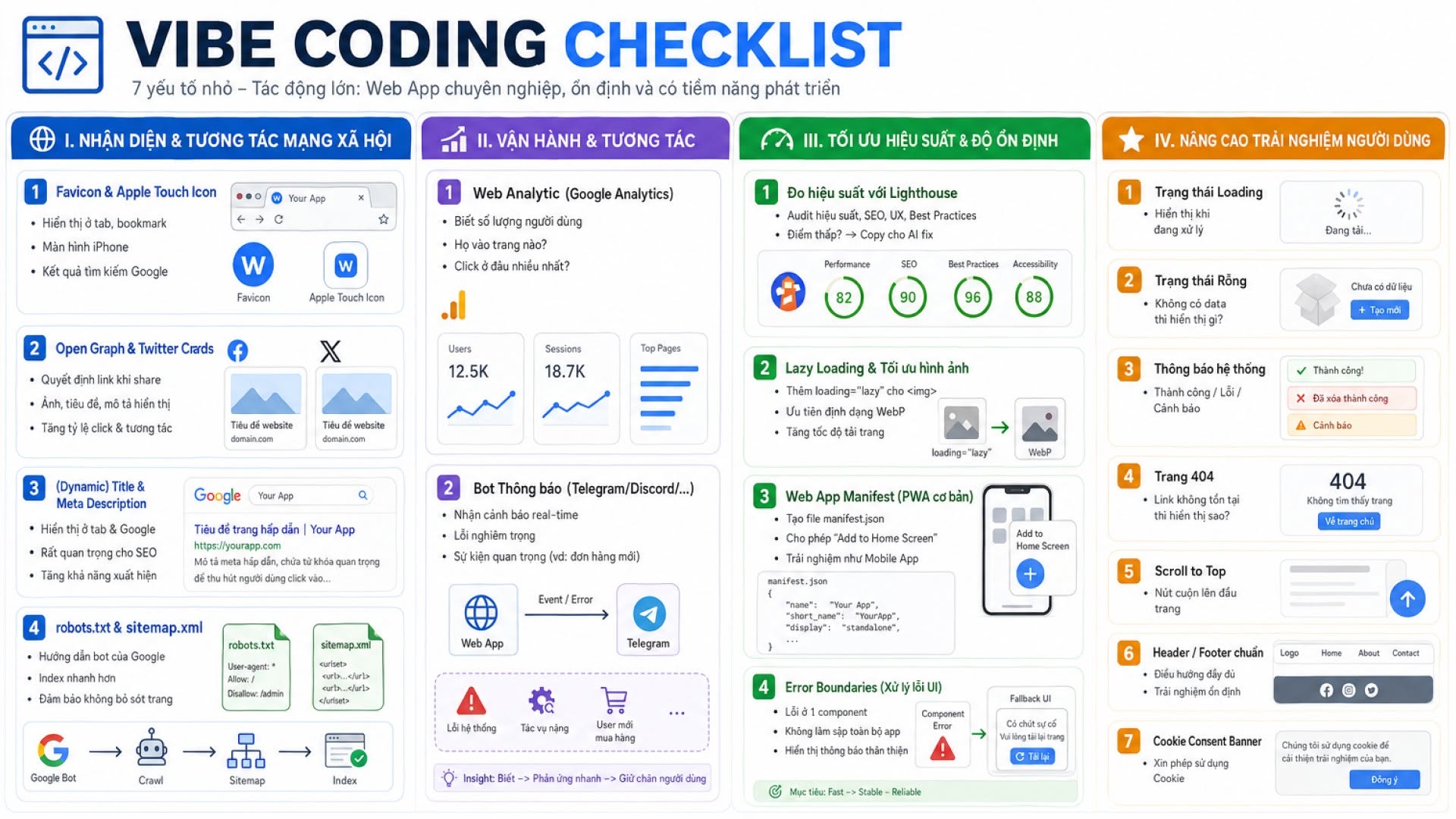
I. Identification & Social Network Interaction
- Favicon & Apple Touch Icon — displayed in the browser tab, when saving to the iPhone screen, in Google search results... If you're lazy, just use the logo, or use a favicon creation tool.
- Open Graph & Twitter Cards — decide what the website link looks like when sharing on Facebook, X (Twitter)...: what image, what is the title. (This is the reason why many websites shared on social networks only have text, no images.) Need to prepare an image + title if desired.
- (Dynamic) Title & Meta Description — displayed in the browser tab and very important for Google SEO (making the website easier to find). Doing a good set of Title/Description tags is very valuable - searching for "Le Huy Thai" and the first few results are my website is an example.
robots.txtandsitemap.xml(if needed) — helps Google index the web faster: if you have 5 pages, you will soon see all 5 pages in search results.
II. Operation & Interaction
Creating a vibe coding web app is fast, but how many users are there, how many visits have there been in the past month, are there any serious errors...? Not knowing these things is quite lacking.
- Web Analytics (eg Google Analytics) — know how many visitors there are, which pages they like, and where they click the most. In short: know how the world is using your web app.
- Notification bot (Telegram / Discord…) — very useful in the beginning. The web app sends you messages: serious errors (usually when calling a 3rd party, heavy tasks, uncertain logic) so when to check, or events that need attention (for example, a new user makes a purchase).
III. Optimize performance & Stability
- Measure performance — using the built-in DevTools Lighthouse (right click > Inspect > Lighthouse > Analyze page load). The score is too low or there is a serious problem → copy it to AI to fix.
- Lazy Loading images & optimizing format — AI often lets the entire image load at once, making the website slow. Tell it to add
loading="lazy"to theimgtag and prioritize the WebP format. - Web App Manifest (basic PWA) — tells AI to create
manifest.json. Simple but helps the browser recognize the web as an application, allowing "Add to Home Screen" on the phone. Let's say you have a mobile app from the web app at a cost of 0 VND, under 30 minutes. - Error Boundaries — if a component has a logic error, the entire screen may go blank. Ask the AI to wrap the app in Error Boundary so that when there is an error, it only shows "Some problems, please reload the page" instead of crashing completely.
IV. Enhance user experience
AI can do these things, but I'll just include them as a checklist to make sure:
- Loading status for screen, area…
- Empty Status — if there is no/no data, why is it displayed?
- System message — delete, create... there should be a small popup/toast.
- 404 Page — What happens if the link does not exist?
- Scroll to Top — needed for long websites.
- Standard Header / Footer — full, stable navigation between pages.
- Cookie Consent Banner (if needed) — small bar at the bottom of the screen asking for permission to use cookies.