
Process
Process of building a project from scratch with Antigravity (Solo Builder)
Process of building a project from zero in Solo Builder style with Antigravity: from AGENTS.md, docs folder (brief/BRD/plans/changelog), setup Kit/MCP/Rules/Skill, to phase-by-phase loop and release.
22/06/2026 · 5 min read · Lê Huy Thái
I share the process of building a project from scratch with Antigravity in the Solo Builder style - so that everything is clearest, the process is complete, so when you look back, you will know where you are. Solo Builder
1. Early AGENTS.md
This is Anti's "constitution" file — always loaded in context. At this step, I usually put the feedback style, techstack... here. For example:
- Always instruct manual testing after each phase/plan.
- Complex tasks that users have to do — if you can write a script, use a browser... let AI do it for you, then you should suggest it.
This file doesn't need to be beautiful, just a basic rule setup for AI. We'll circle back later.
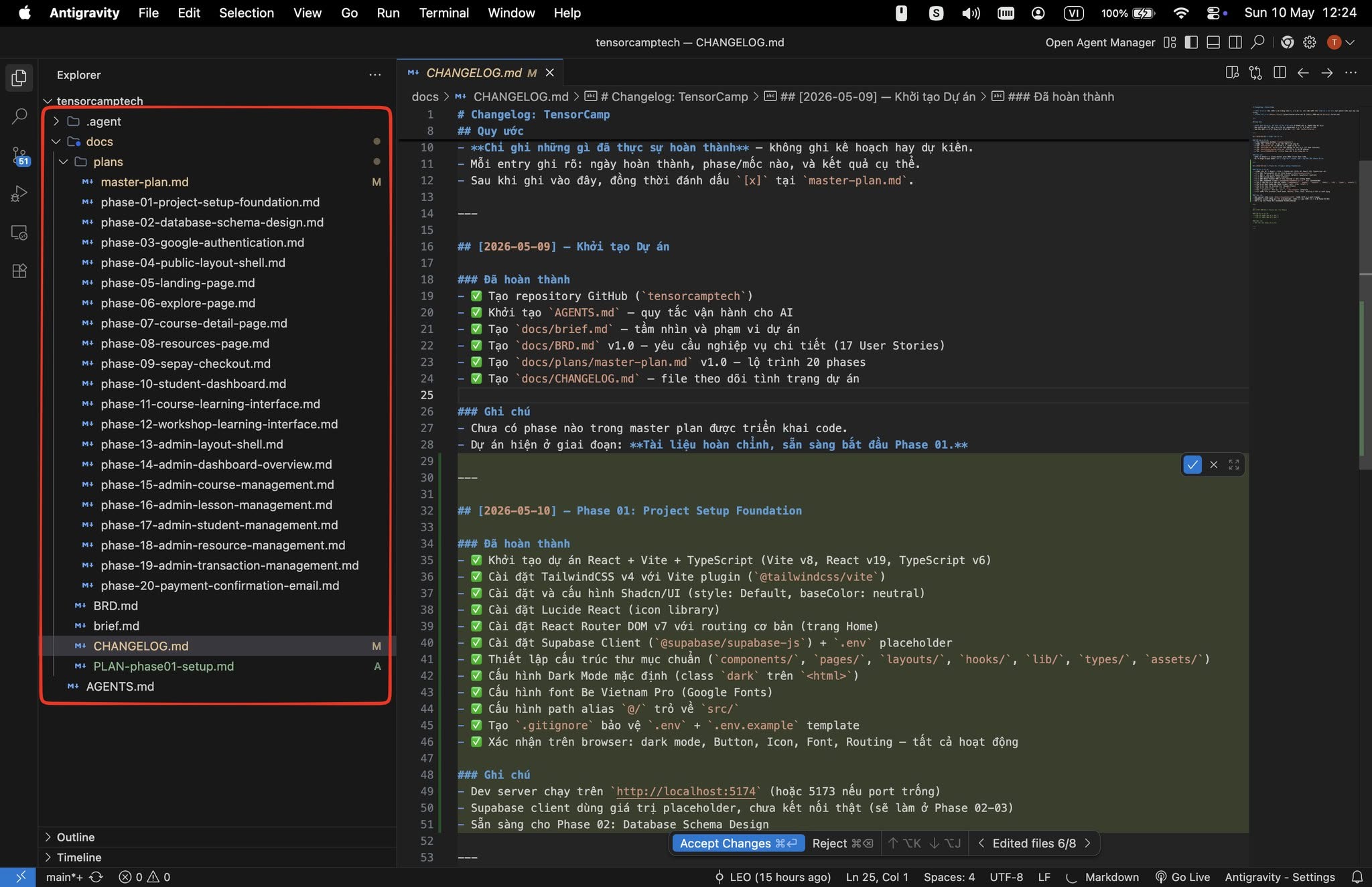
2. Set up the docs folder
In this era, docs are mainly for AI to read
brief.md— wishes, ideas, project description: what is the project, what do you want. Write in natural language, for the reader.BRD.md— more detailed than brief: what functions are there, user personas, important technologies, important flows, do/don't.plans/— all phases to complete the project. There is amaster-plan.mdthat stores all phases + states, andname-phase.mdfiles that record what to do, output expectations, testing instructions (of course, which phase to do, the detailed plan for that phase).CHANGELOG.md— saves changes after each function, bug fix, refactor... so that both humans and AI know where the project is.
Have an idea → talk to AI → brief → talk to AI → BRD → talk to AI → plans
3. AGENTS.md rework
This is enough project information. Tell the AI to rely on the docs/ directory to recreate a professional AGENTS.md. Don't forget to add the CHANGELOG.md update trigger logic here. After each work, AI will have context thanks to this file.
4. Setup Kit, MCP, Rules, Skills, Workflow (if necessary)
Enough context to know what to do, now do a little research:
- Can I use Kit, which kit is suitable?
- What 3rd party do you use, does it have MCP? Install Context7 if you don't have it yet.
- Are there any rules that need to be followed?
- Are there any special/interesting skills for this project?
- Is there a process that goes back and forth to form a workflow?
A bit vague? Quick Q&A:
5. Anything else, let's set it up
Anything else that is necessary can be set up in this step, for example:
- Git
- Environment
- UI Design
- …
6. Phase by phase and infinite loop
Enough toys here, let's start coding (it's time to code). Each of my phases:
- Pick task — see what needs to be done.
- Plan — detailed plan, checklist, expectations, testing methods.
- Review plan — is it reasonable? Update if necessary.
- Execute — AI does; I go surfing Facebook, watching YouTube, or jumping to another project.
- Review execution — read the AI walkthrough, review git diff to see if there's anything unusual.
- Test — tell AI to turn on browser test / write-run unit test / manual test (depending).
- Update / fix / improve if necessary — AI is not always good right away; The vague things now have something to look at.
- Review + Commit — review the diff more thoroughly, commit + push if necessary.
- Repeat infinitely until the project is complete.
While working, group repetitive things into skills/workflow/rules. For example: workflow create-page (create new page), rule response-format (always report scope changes + how to test), skill ui-guideline (build consistent UI).
7. Overall review, release checklist, some small things
The project is done, let's do a few things before going into production:
- Review (by AI) to see if there are any problems, how the security is, refactor/improve whatever you want. Install or package your own skills for this if needed.
- Little things: favicon, OG photo, Google Analytics... etc.
8. Deploy
From here, it is beyond the scope of Antigravity.